INTEGRATIONS THAT SCALE

Shop 1 is correct. Shop 3 is three weeks behind.

When every webshop has its own integration, they drift apart sooner or later. We build one integration layer that carries product data, prices and stock to every brand, country and channel.
SOUND FAMILIAR?

The symptoms are always the same

On their own they look like incidents. Together they point to one cause in the architecture.

Prices and stock are wrong

A customer calls about a price that differs from the invoice. Or you sell something that is no longer in stock, because every shop keeps its own count.

Shops drift apart

A product change lands on the main shop but not on the brand shops. Nobody notices until a complaint comes in.

Every shop is a new build

Each new shop means building the same integration again, slightly differently than the last. A new system touches all of them.

The knowledge sits with one person

How it works is known by one developer, or by an agency you have since parted ways with. There is no log, no alert, no overview.
THE CAUSE

Point-to-point integrations do not scale

With one webshop, a direct connection to your ERP makes sense. With five shops and four systems you are looking at twenty connections, each built separately, each with its own mapping, each able to break on its own.

Every new shop becomes a build project instead of a setting. A different WMS means not one change but five. And errors stay invisible until they become commercial.

The question is not which integration is best. The question is whether your architecture moves with you when you add brand number six.

Twenty separate point-to-point connections between shops and systems
One integration layer between ERP, WMS and all sales channels
THE SOLUTION

One integration layer between source and channels

Instead of shop-to-system connections, you put one layer in between. Every system talks to that layer once; every channel takes what it needs.

  • Adding a new shop — configuration on existing flows, not a new build project
  • Replacing a system — one connection to adjust instead of all of them
  • Finding errors — central logging and monitoring, no hunting per shop
  • Knowledge — in an environment you can see yourself, not in one person's head
  • A new channel — an extra outlet on data that already flows through

We build this layer with Alumio: an integration platform where flows are visible, restartable and monitored. No black box.

IN PRACTICE

Adding a brand without building new integrations

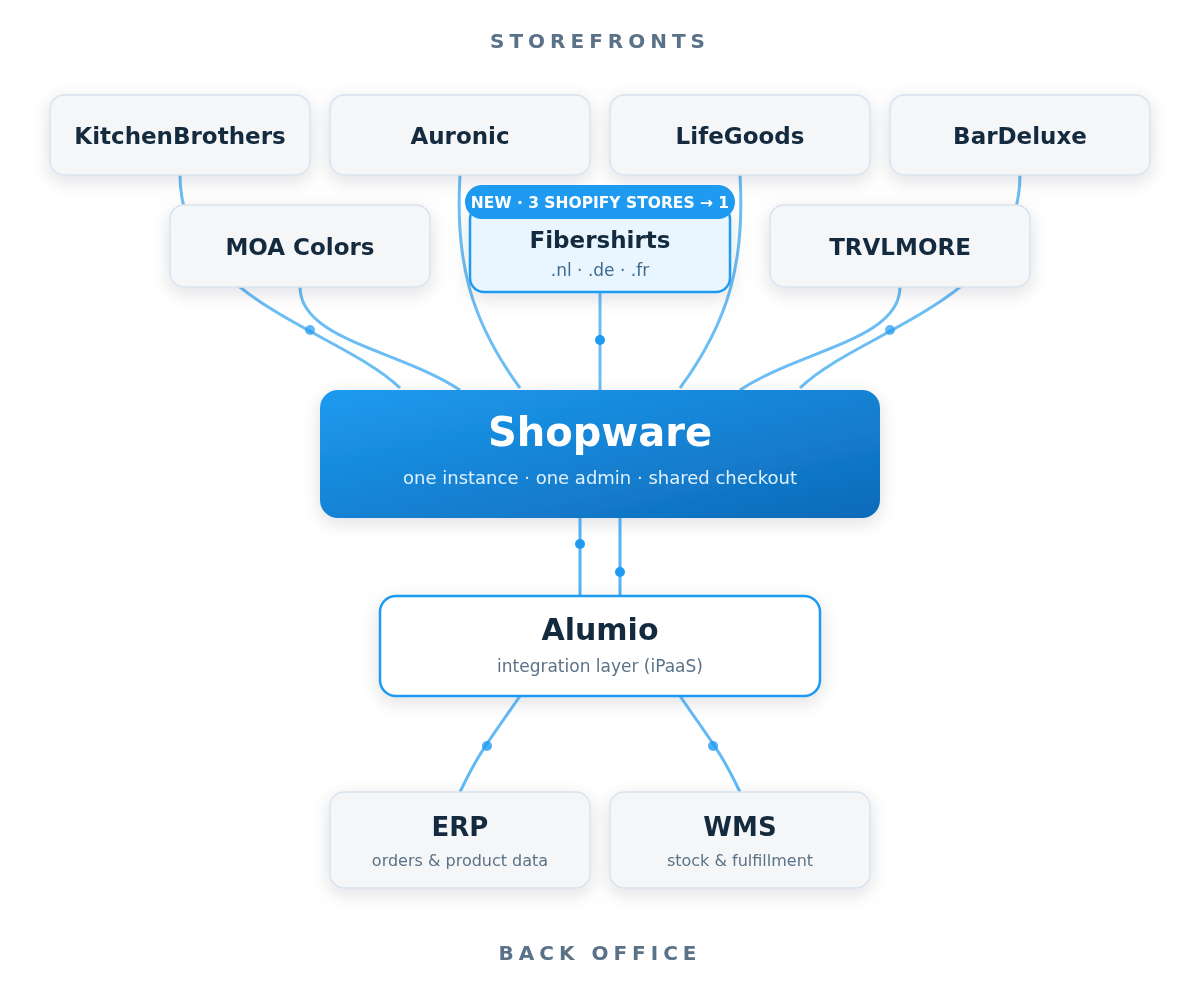
At LifeGoods, Alumio connects one Shopware instance to the ERP and the warehouse system. Orders, stock levels and product data flow back and forth automatically, for all seven brands on the platform.

CASE: LIFEGOODS

Three Shopify stores acquired, zero new integrations built

The brand Fibershirts arrived as three separate Shopify stores for the Netherlands, Germany and France. We migrated them onto the existing Shopware environment and consolidated them into one multi-language storefront.

Because the foundation and the integration layer were already in place, there was no new platform project, no new hosting and no new integration. Orders and stock for all three countries run through the same connections as every other brand.
WHAT OUR CLIENT SAYS

On working together

“What stood out most was how consistently flexible Memo remained throughout the entire project.”

FREQUENTLY ASKED QUESTIONS

Questions about integrations

What is the difference between middleware and a custom integration?

A custom integration connects two systems directly and is tailored to exactly that. Middleware sits in between: every system connects once, and the logic lives in one place where you can inspect, monitor and change it. With two systems, custom is often faster; from three onwards it tips.

Do I have to replace all my existing integrations at once?

No. We move flows over one at a time and leave the old ones running until the new one is proven. No big bang.

Does this work if my shops run on different platforms?

Yes. An integration layer is platform independent. At LifeGoods that was exactly where the gain was: a brand on Shopify could be brought onto the existing Shopware foundation without rebuilding the connections.

How do I know when a sync has failed?

That is the point of monitoring. Every flow is visible, failed messages can be restarted, and you can review exactly what was exchanged. Without that you stay dependent on customer complaints.

Does everything need to sync in real time?

Not everywhere. Stock and prices usually do, product content usually does not. Scheduled synchronisation is more stable and cheaper for many flows. We decide that per flow, not as a blanket rule.

GET STARTED

Start by knowing what is running today

In 30 minutes we map your current integrations and point out where they are fragile. You get an overview that has value even if you do nothing further with us.